React는?
Facebook에서 만든 자바스크립트 라이브러리. 웹앱을 만들기 위해서 사용하며 페이지를 다시 로드하지 않고 데이터를 변경할 수 있다. 국내에선 대부분 React 혹은 Spring 안쓰면 큰일나는 줄 알아서 개발자로 빨리 취업하고 싶을 때 배우면 빠른 취업을 위한 지름길이 될 수 있다.
React – 사용자 인터페이스를 만들기 위한 JavaScript 라이브러리
A JavaScript library for building user interfaces
ko.legacy.reactjs.org
개발환경셋팅
1. nodejs 다운
Node.js
Node.js® is a JavaScript runtime built on Chrome's V8 JavaScript engine.
nodejs.org
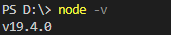
가능하면 채신버전 다운받아서 쓸 것. (본인 버전)
2. vscode 에디터 다운(개인용 에디터 있으면 필요 x)
Visual Studio Code - Code Editing. Redefined
Visual Studio Code is a code editor redefined and optimized for building and debugging modern web and cloud applications. Visual Studio Code is free and available on your favorite platform - Linux, macOS, and Windows.
code.visualstudio.com
3. 폴더 생성
원하는 위치 있으면 따로 만들면 되고, 본인은 바탕화면에 react 폴더 만들어서 진행.
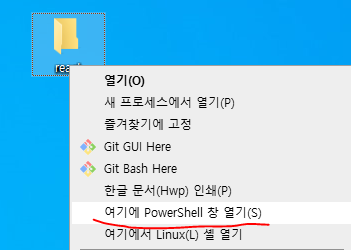
터미널에서 바탕화면 디렉터리로 이동하거나, 만든 폴더 shift+우클릭을 통해 powershell 창 열기 클릭
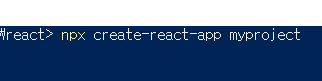
shell창에서 명령어 수행. npx create-react-app 프로젝트명
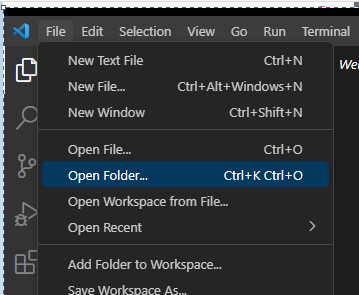
이후 vs코드에서 폴더 열기로 react 폴더 혹은 개인이 만든 폴더에서 프로젝트명 선택 후 열기
상단 메뉴에서 Terminal - New Terminal 에서 npm start 치고 엔터

그럼 localhost창이 새로 뜰텐데 뜨지 않는다면
http://localhost:3000 링크로 접속하면 된다.

'IT > React' 카테고리의 다른 글
| [React] 가중치 랜덤 알고리즘(Weighted Random Picker)을 적용한 확률형 뽑기(룰렛) 만들기 (0) | 2023.06.16 |
|---|---|
| [React] 업비트 API로 비트코인 map 반복문으로 출력해보기 (2) | 2023.05.31 |